
WHY GENABLER EXISTS?
Civil 3D is powerful, but it is not forgiving.
Anyone who has used it seriously knows the pattern: the engineering itself is straightforward, but producing acceptable drawings—with consistent styles, readable labels, standard‑compliant parts, and presentable plans and profiles—takes disproportionate effort. Much of that effort has little to do with engineering judgment and everything to do with navigating styles, catalogs, band sets, and undocumented Civil 3D behavior.
Genabler exists to reduce that friction. It is a focused plugin that enables engineers to produce complete, clean, and standardized Civil 3D outputs without needing to become Civil 3D specialists or BIM modelers.
THE CORE PROBLEM GENABLER SOLVES
In many engineering teams, especially small consultancies or project‑based team, there are no dedicated BIM modeler.
The reality often looks like these for Civil 3D users:
🧑💻📐
Engineers are expected to design and produce drawings.
🧩⚙️
Civil 3D styles, catalogs, and labels are missing, defaults are bland, and their configurations are hard.
🔄❌
Pipe and pressure network catalogs that exist out of box don’t necessarily match the available ones out there.
🧠🛠️
Producing a presentable plan or profile requires proficiency with specific Civil 3D features that engineers neither enjoy nor have time to master.
WHAT CAN GENABLER DO (AND CAN'T DO)?
Do: Real‑World, Ready‑to‑Use Part Catalogs
Genabler provides built-in gravity and pressure network parts based on actual manufactured components.
- Malaysia‑standard part sizes are available out of the box
- Engineers work with parts that reflect construction reality
- Adding gravity network part sizes easily, does not require deep catalog‑editing knowledge
Do: One‑Step Styling for Plans and Profiles
Civil 3D styling is powerful, but the downside is hard to learn and hard to modify, and the built-in styles are uninspiring. Genabler provides:
- Clean, readable plan and profile labels
- Consistent, visually balanced styles
- Styles that are configurable but immediately usable
The intent is not to lock users into a black box, but to provide sane defaults that already look professional.
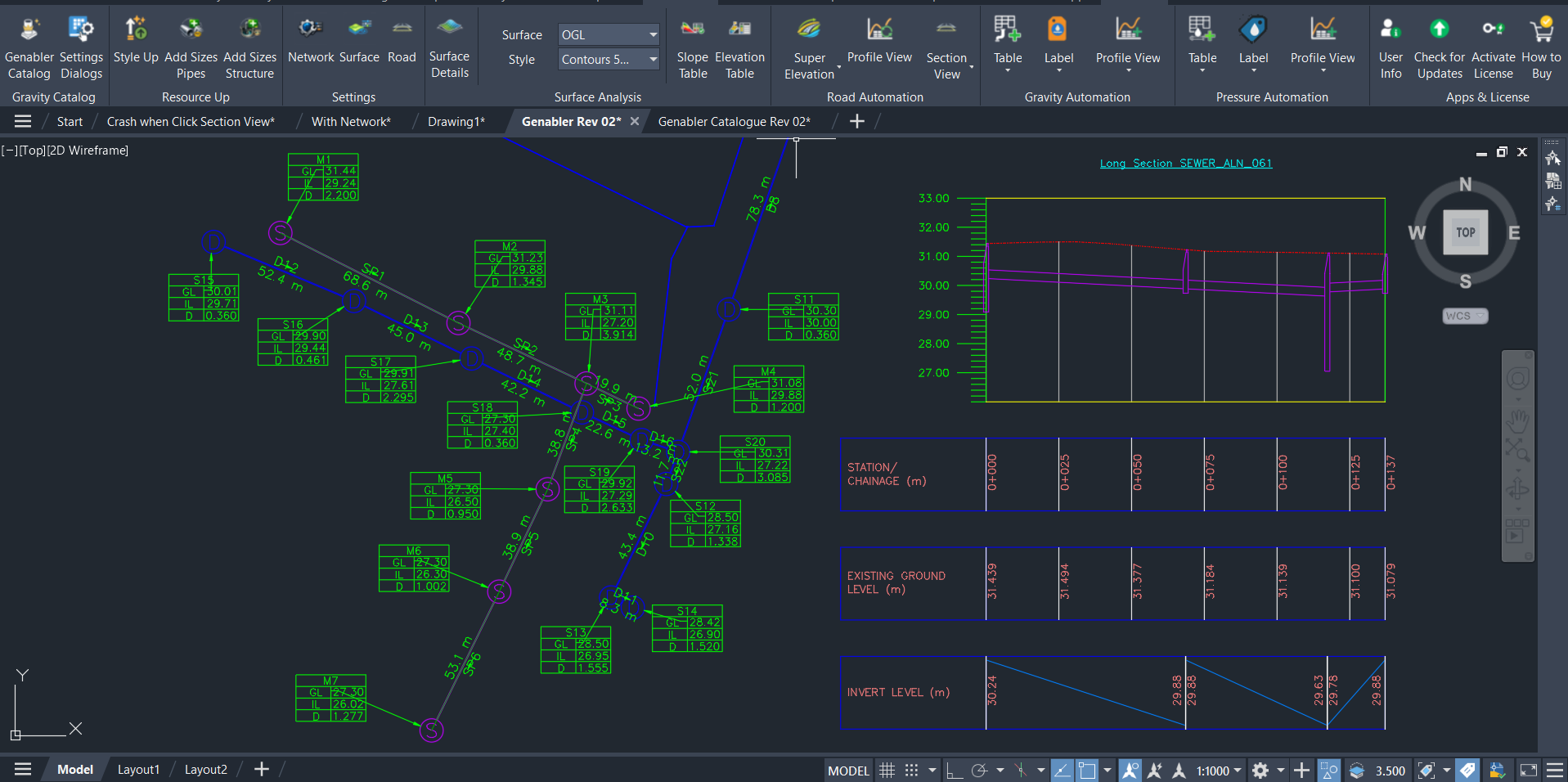
Do: Drawing Production Without BIM Specialization
Genabler is designed for engineers with only AutoCAD‑level knowledge. You can already:
- Generate plans, profiles, and tables
- Apply relevant styles correctly, and update the labels easily.
- Avoid touching low‑level Civil 3D configuration such as style hierarchies, band sets, or corridor logic
This is especially valuable when engineers are under schedule pressure and need predictable output.
Do: Seamless MCIntegrator Workflow
For teams starting from MiTS and using MCIntegrator, Genabler fits even more naturally into the workflow.
- Design in MiTS
- Synchronize via MCIntegrator
- Use Genabler to produce one‑shot, presentable Civil 3D drawings
No handoff to a BIM specialist is required to reach a deliverable state.
Don't Do: Infrastructure Design and Modelling
That would need MiTS and MCIntegrator to sync over to Civil 3D.
COVERAGE: FOCUSED, NOT BLOATED
Genabler deliberately focuses solely on the needs of Infrastructure Engineer’s BIM needs. Current coverage includes:
Earthwork and Quantity‑Related Visuals
- Cut and fill contours
- Cross section detailing
Road Styling
- Section Views
- Profile Views
- Quantity calculation
Network Styling for Gravity and Pressure Systems
- Table Styles
- Plan Label Styles
- Profile View Band Set Styles.
SEE THE DIFFERENCES!
🧩 Genabler Only
Styling & Precision Tool
Best for improving output quality, but lacks automation and workflow integration.
👎🏻 No 2-way sync
👎🏻 No analysis/design
👎🏻 No report/ checking/ 3D View
👎🏻Require Civil 3D knowledge (big skill)
👎🏻 No automated workflow
👎🏻 Unable to fulfill BIM submission
✅ Strong styling & labels
✅ MS Standard Catalog
✅ Always exact dimensions
⚙️ MCIntegrator Only
Automation Engine
Great for workflow automation — but limited in output quality and standardization.
✅ 2-way sync
✅ Analysis & design
✅ Report/ checking/ 3D View
✅No Civil 3D expertise needed (big skills)
✅ Automated workflow
⚠️ BIM submission needs checking
🟡 Basic styling (Default Civil 3D styles)
👎🏻 No MS catalog
👎🏻 Dimension inconsistencies
🔥 MCIntegrator + Genabler
All-in-one Workflow
Automation + Precision + Submission-ready output.
✅ 2-way sync
✅ Analysis & design
✅ Report/ checking/ 3D View
✅No Civil 3D expertise needed (big skills)
✅ Automated “fire & forget” workflow
✅ Seamless, one-shot to BIM submission
🌟 Best styling & labeling
✅ MS Standard Catalog
✅ Always exact dimensions
EXTRA SERVICE
Free Style Creation (5 times)
You have your own styles that are not covered? We can create it for you! For free, up to 5 styles.
THE ECONOMIC CASE
The price needs context. Alternatives typically include:
- Paying BIM modellers to configure catalogs and styles
- Hiring or outsourcing BIM modeling just to reach drawing deliverables
- Accepting inconsistent or lower‑quality outputs due to time constraints
Genabler amortizes its cost across multiple projects, engineers, and years. Once installed, the marginal cost of producing clean, standardized drawings drops significantly.
WHO SHOULD CONSIDER GENABLER?
Genabler is a strong fit if:
- Engineers use Civil 3D but dislike detailing and styling
- There are no full‑time BIM modelers
- Drawings must look consistent and professional, not default to Civil 3D styling
- Engineers are expected to produce deliverables end‑to‑end
Teams with mature, in‑house BIM pipelines may find less value. For everyone else, Genabler removes a recurring source of friction between engineering intent and deliverable output.